LA-BRI'UT: TO OUR HEALTH AND WELLNESS
  • Home
  • Background
  • For Teachers
    • Sukkat Shalom
    • Ometz Lev
    • G'vurah
    • K'hillah
    • Hesed
  • For Learners
    • Sukkat Shalom - L
    • Ometz Lev - L
    • G'vurah - L
    • K'hillah - L
    • Hesed - L
  • Prof'l Dev Resources
    • Curriculum Content
    • La-bri'ut Song
    • Videos for PD
    • Tech Tutorials
    • What's Next?
  • Home
  • Background
  • For Teachers
    • Sukkat Shalom
    • Ometz Lev
    • G'vurah
    • K'hillah
    • Hesed
  • For Learners
    • Sukkat Shalom - L
    • Ometz Lev - L
    • G'vurah - L
    • K'hillah - L
    • Hesed - L
  • Prof'l Dev Resources
    • Curriculum Content
    • La-bri'ut Song
    • Videos for PD
    • Tech Tutorials
    • What's Next?

Helpful tutorials to prepare you for the technology used in the curriculum:

Zoom:

General Features:
Use Screen Share:
​Use Breakout Rooms:

Flipgrid:

FlipGrid Tutorial Video Series for Teachers
Note that this teacher offers pretty clear instructions, but not all will apply to your needs.
​Part 1: Setting Up Flipgrid

Part 2: Sharing Flipgrid with Students 

Part 3:  Create a Flipgrid Topic
​
Part 4: Student Responses
Video instructions from Phyllis Sommer to her staff at Am Shalom, Chicago (click on each link, below)
  • Setting up Flipgrid
  • Sharing flipgrid links with learners 
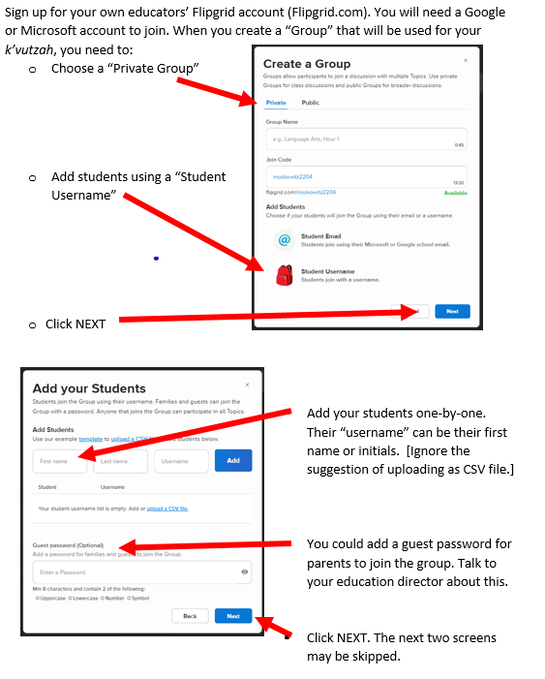
The instructions, below, allow your learners to upload to Flipgrid without having their own email account. 
Picture
Flipgrid Tutorial by Rabbi Phyllis Sommer 
(from the Ometz Lev, 10/2020 webinar)'
Starting at 27:10


Kahoot:

How to CREATE a Kahoot game: 
How to RUN a Kahoot game: 
Jewish Education Center of Cleveland
http://www.jecc.org
Powered by Create your own unique website with customizable templates.